Resume / CV Builder — Browser-Based PDF Resume Maker
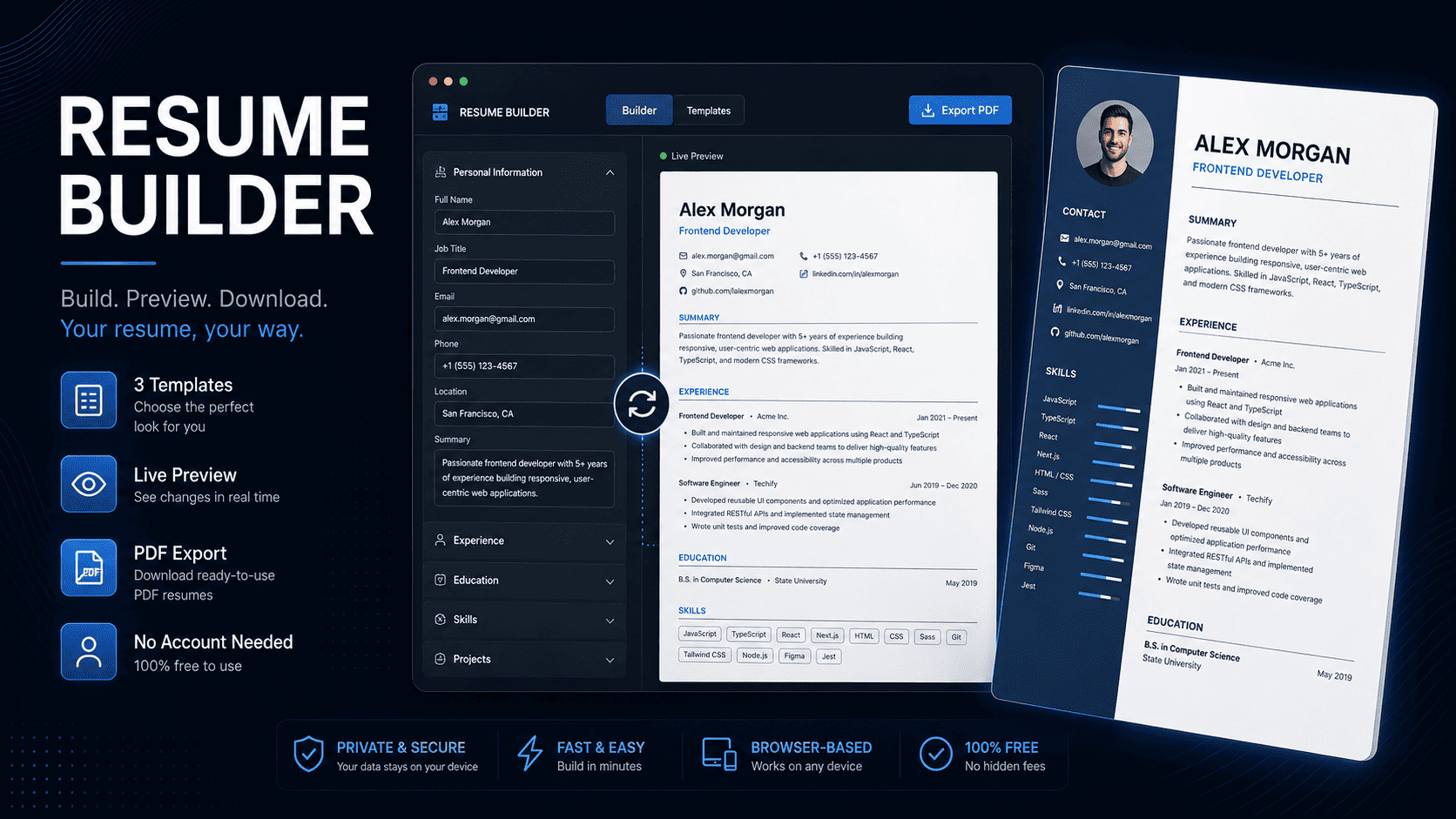
Fill a form, pick a template, download a polished PDF resume — all in the browser. Three templates (Classic, Modern, Minimal), live A4 preview, auto-save, and JSON backup. No account, no install, no server.
About This Product
Build a polished PDF resume in minutes — entirely in your browser, no account or install needed
Resume / CV Builder is a fully browser-based resume maker built with plain HTML, CSS, and vanilla JavaScript. Open index.html in any modern browser and start building your resume immediately. Nothing to install, nothing to sign up for, and no data ever leaves your device — everything is saved locally in your browser.
Three Professional Templates
- Classic — left-aligned layout with serif headings and clean horizontal rules; timeless and ATS-friendly
- Modern — two-column design with a colour-accent sidebar for contact info and skills, main area for experience and education
- Minimal — single-column, tight spacing, monospace name heading; ideal for developers and designers who prefer clean simplicity
Switch between templates at any time using the tabs at the top — your data stays intact.
All the Sections You Need
- Personal Info — name, job title, email, phone, location, LinkedIn, website, and optional profile photo (stored as base64)
- Summary / Objective — free-form professional summary textarea
- Work Experience — company, title, location, start/end dates (with "Present" option), and per-entry bullet points
- Education — institution, degree, field, year, and optional GPA
- Skills — type a skill and press Enter to add it as a tag; click × to remove
- Projects — name, description, tech stack, and optional URL
- Certifications — name, issuer, and year
- Custom Section — name it anything (e.g. "Volunteering") and add free-form bullet points
Live A4 Preview
The right panel renders a pixel-accurate A4 resume as you type. Debounced updates keep the UI smooth with zero lag. The preview scrolls independently — the form panel stays fixed so you never lose your place.
PDF Export
Click ⬇ Download PDF to generate a clean, print-ready PDF using jsPDF. The filename is set automatically to firstname-lastname-resume.pdf. Render quality is crisp — no blurry text.
Save, Export and Import
- Auto-save — every change is saved to localStorage automatically; close the tab and your resume is still there when you return
- Export JSON — download a full backup of your resume data as a JSON file
- Import JSON — restore a backup or switch between multiple saved resumes
- New Resume — clear everything with a confirmation dialog to start fresh
Appearance Customisation
- Accent color picker — changes the header bar or sidebar colour depending on the active template
- Font size slider — adjust body text between 10 px and 13 px to fit more or less content on one page
What Is Inside the Download
index.html— the complete app shell; open this in a browser to run itapp.js— all application logic: form state, localStorage persistence, PDF generation, live preview renderingtemplates.js— render functions for Classic, Modern, and Minimal templatesstyle.css— full styling; CSS Grid for the two-column template, CSS variables for theming, clean and easy to customiseREADME.md— setup guide with three deployment options, customisation walkthrough, and troubleshooting table
How to Run It
- VS Code Live Server (recommended) — right-click
index.html→ Open with Live Server; PDF export works perfectly - Python —
python -m http.server 8080then openhttp://localhost:8080 - Deploy — drag the folder into Netlify Drop or Vercel for a shareable public URL in under a minute
Note: the app uses ES modules, so it must be served over HTTP — opening index.html directly via file:// will cause PDF to be blank.
Tech Stack
- Pure HTML5, CSS3, and vanilla JavaScript (ES6+) — zero frameworks, zero build steps
- jsPDF 2.5 — client-side PDF generation via CDN
- Browser localStorage — all data stored locally; nothing sent to any server
Who Is This For
Perfect for job seekers, students, freelancers, developers, and designers who want a fast, private, no-friction way to produce a professional resume PDF — without signing up to a SaaS platform, sharing personal data with third-party servers, or paying a monthly subscription.
Customising Templates
Templates are defined as functions in templates.js. Each function returns an HTML string that is injected into the preview panel. Styles for each template live under clearly labelled sections in style.css. Adding a new section type takes three steps: add the field to the state object in app.js, add the form input to index.html, and render it in each template function.
License
Single-use commercial license. Use it for your own resume, customise it freely, and embed it in client projects. Reselling or redistributing as a standalone resume-building service or SaaS product is not permitted.
Please agree to the terms before continuing.
Download
Updates
License